Tuesday, October 30, 2012


Thursday, July 28, 2011
How to connect to a Wireless WIFI Network from the Command line in Windows 7
Connection request was completed successfully.
More Details
What happened there? Well, the command line is netsh wlan and the full one is
netsh wlan connect ssid=YOURSSID name=PROFILENAME
What's a profile? It's the only thing required. You can see them with:
C:\>netsh wlan show profile
Profiles on interface Wireless Network Connection:
...snip..
User profiles
-------------
All User Profile : Clear Spot b0e
All User Profile : HANSELMAN-N
All User Profile : Quiznos
More Details
What happened there? Well, the command line is netsh wlan and the full one is
netsh wlan connect ssid=YOURSSID name=PROFILENAME
What's a profile? It's the only thing required. You can see them with:
C:\>netsh wlan show profile
Profiles on interface Wireless Network Connection:
...snip..
User profiles
-------------
All User Profile : Clear Spot b0e
All User Profile : HANSELMAN-N
All User Profile : Quiznos
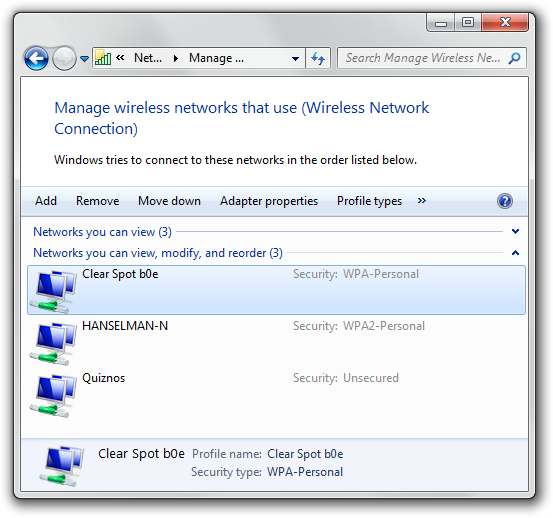
You can set these up and refer to them by name from the command line, or a batch file, etc. Nice to do for the places you are regularly.
If you have multiple wireless cards (What's wrong with you!?) then you have to be more specific:
netsh wlan connect ssid=YOURSSID name=PROFILENAME interface="WIRELESS NETWORK CONNECTION"
And of course, you can
netsh wlan disconnect
And include the interface optionally, for multiple interfaces. Additionally, interesting things can be seen with
netsh wlan dump
This is nice because you can
netsh wlan dump > myconfig.txt
on one machine and then later on another machine
netsh exec myconfig.txt
All this command line love will work in most versions of Windows, actually, not just 7 AFAIK. There's lots of more detail and docs on managing Wireless Profiles on the Web.
Enjoy! (From Scott Hanselman Blog)
Wednesday, July 27, 2011
Visual Studio LightSwitch 2011 Released Tue, 26 Jul 2011 17:50:00 Z
Visual-Studio-LightSwitch-2011-Reviewers-Guide
System Requirements for Microsoft Visual Studio LightSwitch 2011
Supported Operating Systems:
Windows® 7; Windows Server 2003 R2 (32-Bit x86); Windows Server 2003 R2
x64 editions; Windows Server 2003 Service Pack 2; Windows Server 2008 R2;
Windows Server 2008 Service Pack 2; Windows VistaTM Service Pack 2;
Windows XP Service Pack 3
+ Windows XP (x86) with Service Pack 3 – all editions except Starter Edition
+ Windows Vista (x86 & x64) with Service Pack 2 – all editions except Starter Edition
+ Windows 7 (x86 and x64)
+ Windows Server 2003 (x86 & x64) with Service Pack 2 – all editions
• Users will need to install MSXML6 if not already present
+ Windows Server 2003 R2 (x86 and x64) – all editions
+ Windows Server 2008 (x86 and x64) with Service Pack 2 – all editions
+ Windows Server 2008 R2 (x64) – all editions
Supported Architectures:
+ 32-Bit (x86)
+ 64-Bit (x64) (WOW)
Hardware Requirements:
+ Computer with a 1.6GHz or faster processor
+ 1024 MB RAM (1.5 GB if running in a virtual machine)
+ 3 GB of available hard-disk space
+ 5400 RPM hard drive
+ DirectX 9 capable video card running at 1024 x 768 (or higher) resolution display
Thursday, April 14, 2011
Wednesday, November 24, 2010
Oracle going to support Entity Framework
ODP.NET Production with Entity Framework in 2011
Link for detail about Oracle and .NET Framwork 4, Entity Freamework 4
Tuesday, April 13, 2010
Visual Studio 2010 Released 12-APR-2010
Tuesday, February 9, 2010
Visual Studio 2010 and .NET Framework 4 Release Candidate
download
 | MSDN Subscribers: Download the Release Candidate The Visual Studio 2010 and .NET Framework 4 Release Candidate (RC) is available to MSDN subscribers on Monday, February 8th, with general availability on February 10th. |
Monday, February 8, 2010


Monday, December 7, 2009
What’s New in the BCL in .NET 4 Beta 2
•Complex Number
•Location
•IObservable
•Stream.CopyTo
•Guid.TryParse, Version.TryParse, and Enum.TryParse
•Enum.HasFlag
•String.Concat and String.Join overloads that take IEnumerable
•String.IsNullOrWhiteSpace
•Environment.SpecialFolder additions
•Environment.Is64BitProcess and Environment.Is64BitOperatingSystem
•Path.Combine params support
•TimeSpan Globalized Formatting and Parsing
•Stopwatch.Restart
•StringBuilder.Clear
•IntPtr and UIntPtr Addition and Subtraction operators
•ServiceProcessInstaller.DelayedAutoStart
•ObservableCollection
Monday, November 23, 2009
Microsoft Silverlight 4 Beta available


Enabling Business Application Development
- Printing
- Localization with Bi-Directional and Script-Based Text and Right-to-Left Support
- Rich Text Area Control
- Text Input
- WCF RIA Services
- Managed Extensibility Framework (MEF)
- Viewbox Control
- Auto-Sizing Columns and Copy from DataGrid
- Navigation Page Loading Extensibility
- Command Property on ButtonBase and Hyperlink
- SelectedValue and SelectedValuePath on the Selector
- Support for Referer Header
- UDP Multicast Client Support
- Authentication Support with ClientHttpWebRequest
- IDataErrorInfo
- INotifyDataErrorInfo
- Grouping on CollectionViewSource
- Editable CollectionView IEditableCollectionView
- Binding to String Indexers
- StringFormat, TargetNullValue, FallbackValue
- Databinding Support for Dependency Objects
- ObservableCollection
Constructor Accepts IList and IEnumerable Empowering Richer Experiences Fluid UI States for ItemsControl Implicit Styles MouseWheel Support Right Mouse Click Programmatic Clipboard Access Webcam and Microphone Support CompositeTransform Support for all PNG Formats Offline Digital Rights Management MP4 Playback Protected DRM WMS Multicast Output Protection
Moving Beyond the Browser – Sandboxed Applications
Out-of-Browser Windowing Updates WebBrowser Control HtmlBrush Notifications (Toast)
Moving Beyond the Browser – Trusted Applications
Native Integration File System Access Cross-Domain Networking Access Full File Path on Open and Save Dialogs Full Keyboard in Full Screen Mode
Note: Silverlight 4 Beta is a developer release. There is no “go-live” licensing available as the end-user runtime of Silverlight 4 Beta is not generally available.
Tuesday, April 21, 2009
Microsoft Innovation Day & Steve Ballmer Key note Speaker
Date: April 22nd 2009.
Location: Intercontinental City Stars, ElSaraya Ballroom
Start | End | Session | Speaker | Community |
9:00 | 10:00 | Registration & Coffee Break - Recruitment Booths - Surprise Fun Activity | ||
10:00 | 10:30 | Opening Speech | Ahmed Adel | |
10:30 | 10:45 | How Do I: Work with Fantastic 40 MOSS templates | Shady Khorshed | Barmagy |
10:50 | 11:05 | ??? | ??? | EGJUG |
11:10 | 11:25 | How Do I: Protect from Cross Site Request Forgery Attack in ASP.NET | Mostafa Siraj | Cutting Edge |
11:30 | 11:45 | How Do I: Use Jquery in SharePoint | Marwan Tarek | EGYSUG |
11:50 | 12:05 | How Do I: Code Fun, Hello Facebook | ??? | Innovation-Hut |
12:10 | 12:25 | ??? | ??? | dotNETWORK |
12:30 | 1:00 | Executive Speech | MS Exec | |
1:00 | 1:30 | Communities Q&A | ||
1:30 | 2:30 | Lunch Break | ||
2:30 | 3:15 | A lap around Azure and Cloud computing concepts | Mohamed Sami | |
3:15 | 4:00 | Developing in a Hybrid Environment | Mohamed Nar & Nohal Rady | |
4:00 | 4:30 | Coffee Break | ||
4:30 | 5:15 | The Future: Software + Services | Mohamed Fayez |

 Posts
Posts


